Download Noum.ai for Mac
Meetings and dictation in one app. This is always the latest stable version.
Free for now, version 0.8.13, 25 MB, macOS 14.2 or later
To recommend the app, send a link to this page. An app forwarded through a messenger may be called damaged by macOS.
Installing
Open the downloaded file
Double-click Noum.dmg in Downloads. A window opens with the Noum app and an Applications folder.
Drag Noum onto Applications
You can close the window afterwards.
Open it and click Done
Open Applications and double-click Noum. macOS stops it: the app is signed with our certificate, but Apple has not checked it yet. That is expected. Click Done, not Move to Trash, which some Macs call Move to Bin.
Allow it in System Settings
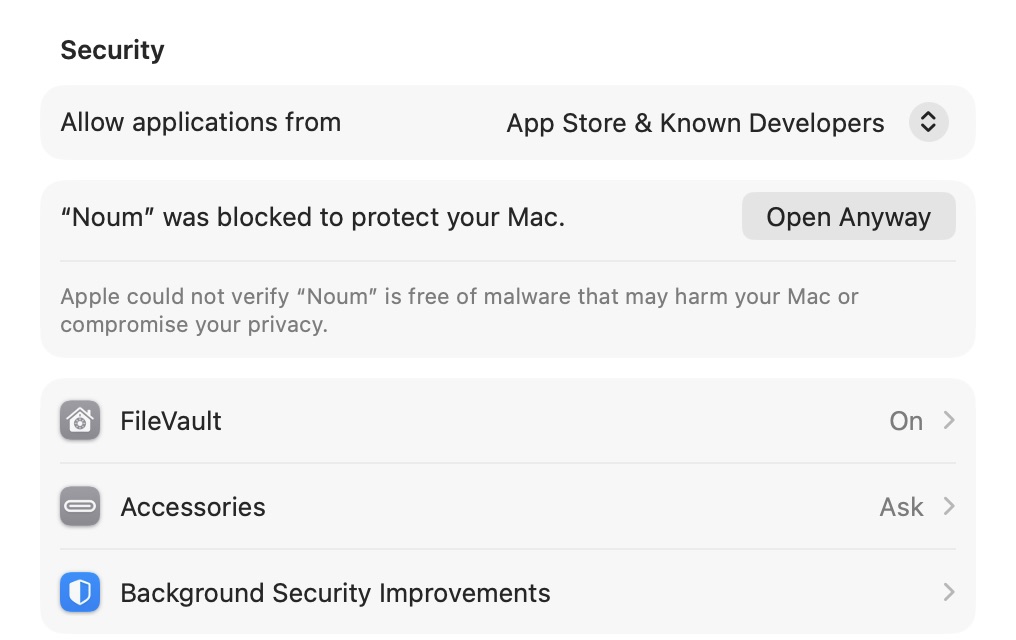
Open the Apple menu, then System Settings and Privacy & Security. Scroll the right side all the way down to Security: there is a line saying “Noum” was blocked to protect your Mac, and an Open Anyway button. It only appears after you have tried to open the app, and stays for about an hour. Files & Folders and the other sections above are not needed.
Confirm
Enter your Mac password or use Touch ID. If macOS asks again, click Open Anyway. This happens only once.
Go through setup
The app walks you through it: what to allow, where to transcribe, what writes summaries and when to start recording. Speech recognition starts downloading straight away, and takes a few hundred megabytes.
After that the app updates itself: a new version downloads in the background and nothing has to be allowed again.
Settings are shown in a screenshot of macOS 27; the other windows are drawn from screenshots. On your Mac they may look slightly different.
If it does not work
- macOS says the app is damaged
- This happens when the app was forwarded through a messenger or packed into an archive again, which breaks its signature. Delete that copy and download the file from this page.
- There is no Open Anyway button
- First try to open the app from Applications and click Done. Then go back to Privacy & Security within the hour and scroll all the way down.
- You clicked Move to Trash or Move to Bin
- No harm done: download the file again and start from the first step.
Will it run on your Mac
- Apple Silicon, macOS 14.2 or later
- Everything works, including transcription on this Mac and dictation.
- Intel Mac, macOS 14.2 or later
- Recording and summaries work. Transcription is cloud-only with your own key, and the live transcript and dictation are not available.
- macOS 14.2 and 14.3
- Recording works, but calls are detected less precisely. Starting recordings by hand is the better choice.
What summaries need
Nothing, if you pick Summaries from Noumy: our server writes them, with no key or subscription, free during the beta. Or bring your own AI: a Claude or ChatGPT subscription will do if you have the Claude Code or Codex app installed, as will your own Anthropic or OpenAI key, or a model on this Mac through Ollama. Recording, transcription and dictation work without summaries.